
- 1
Take a photo
Flat, well lit, the whole page in frame.
- 2
Paste the prompt
Attach the photo in the AI tool you already use, paste the prompt and fill in the [brackets].
- 3
Check it
Fix every UNCONFIRMED and ILLEGIBLE item with the checklist below.
- 4
Send it yourself
Copy the email into Outlook or Gmail and send it.
The prompt
You are helping an office manager / administrator at a small business turn a
photo of HANDWRITTEN staff-meeting notes into (1) a task list and (2) a recap
email to the team.

Business: [BUSINESS NAME]   Meeting: [e.g. Monday staff meeting]   Date: [DATE]
My name/role: [NAME, ROLE]

STRICT RULES - follow all of them:
1. Use ONLY what is written in the photo. Do not add tasks, people, dates,
   numbers, prices, or commitments that are not on the page.
2. OWNER: fill it in only if the notes clearly name who will do it.
   Otherwise write UNCONFIRMED.
3. DUE DATE: fill it in only if the notes clearly give a date or day.
   If the date is hedged ("by Fri??", "maybe", "~", "TBD", or two different
   dates), write UNCONFIRMED and quote the note, e.g.
   UNCONFIRMED (note says "by Fri??"). Never turn "Fri" into a calendar date
   unless the meeting date makes it unambiguous - and say you did.
4. If you cannot read a word, write [ILLEGIBLE: best guess "..."]. Do not
   silently guess. Treat crossed-out text as deleted, but mention it in Notes.
5. Keep reference numbers (invoice, policy, order, listing) and amounts exactly
   as written.

OUTPUT, in this order:
A) TASK LIST - a table with columns:
   # | Item | Type (Scheduling / Billing-Finance / Vendor-Supplies / Facilities /
   Staff-HR / Compliance-Training / Customer-Patient follow-up / Decision /
   Other) | Owner | Due | Status (Open / Done / Decided / Blocked) |
   Exact words from notes
B) DECISIONS MADE - bullet list, only things the notes mark as decided.
C) OPEN QUESTIONS TO CONFIRM - every UNCONFIRMED owner/date and every
   ILLEGIBLE word, phrased as a short question to a named person if one is
   named, otherwise "to the team".
D) RECAP EMAIL DRAFT to the staff: subject + short body. List tasks with owner
   and due date, then "Still to confirm" items as polite asks. Do not include
   any patient/client names, health or HR details - refer to them as
   "the patient" / "a staff member". Friendly, plain, no hype. End with my name.
E) READ-BACK - one line: "I marked X items UNCONFIRMED and Y words
   ILLEGIBLE. Please check them against your notes before sending."
Not sure where to paste it? See where to paste the prompt.
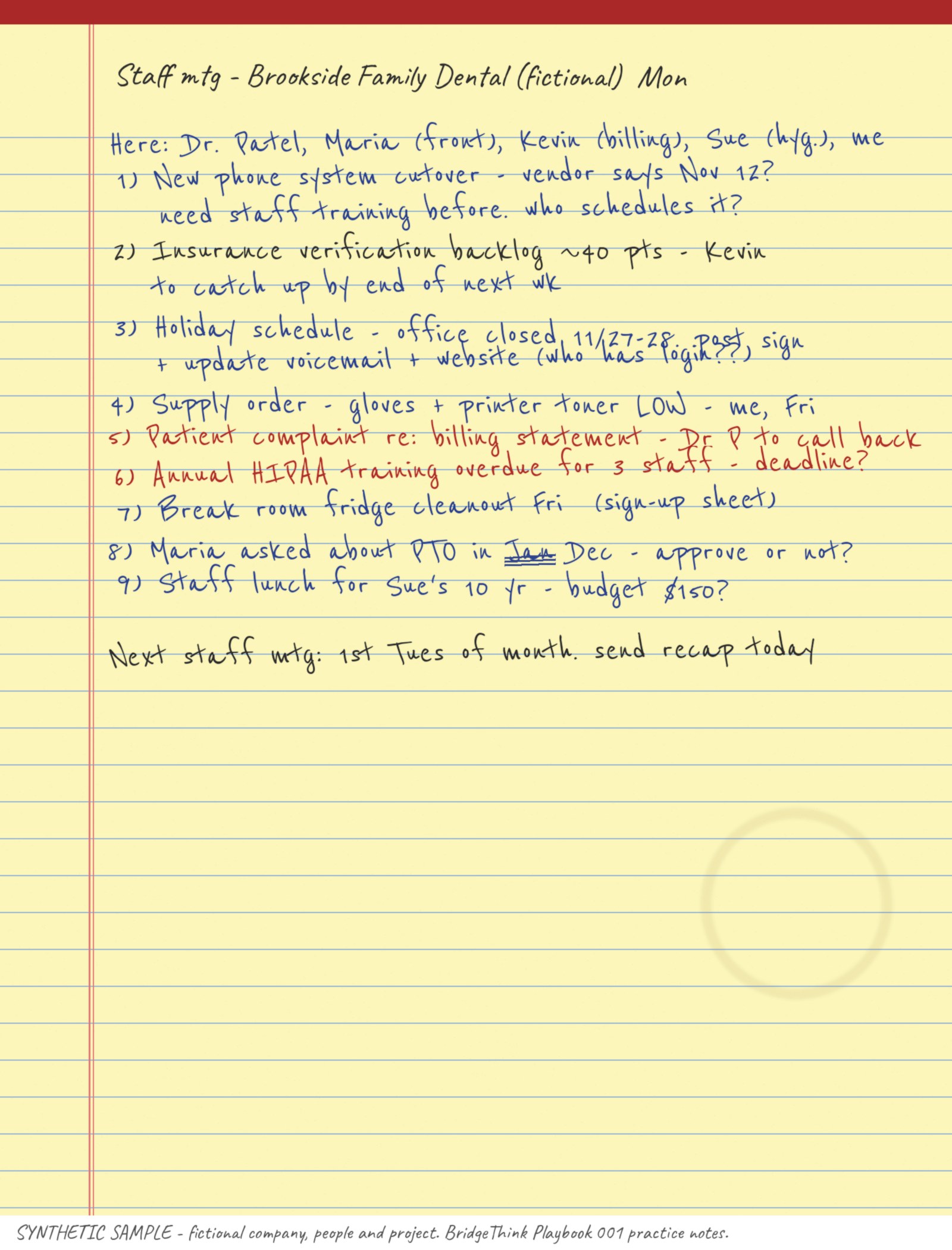
Practice with a fictional page
The sample has deliberate traps, like unclear owners and hedged dates, so you can watch the prompt catch them.
Check before you send
- CountSame number of items as your notes. Nothing missing, nothing extra.
- OwnersEvery name is actually written next to that item. Anything you didn't assign says UNCONFIRMED.
- DatesEvery date is in your notes exactly as written. Hedged dates ("Fri??") say UNCONFIRMED.
- NumbersInvoice, policy and phone numbers match the photo character for character.
- Crossed-out wordsLeft out. (In the practice photo, "Jan" is crossed out, so PTO is in December.)
- PrivacyThe email names no patient or staff health/HR details.
- RecipientsOnly staff who should get it. You send it, not the AI.
Privacy. Don't put patient, client or HR details into a personal AI account. Use initials or leave them out, and follow your office's privacy rules (for example, HIPAA in healthcare). If your office provides a work AI tool, use that.
Recording meetings instead? Open the recorder guide →
Did it work? A two-minute survey helps decide the next playbook.