
- 1
Take a photo
Flat, well lit, the whole page in frame.
- 2
Paste the prompt
Attach the photo in the AI tool you already use, paste the prompt and fill in the [brackets].
- 3
Check it
Fix every UNCONFIRMED and ILLEGIBLE item with the checklist below.
- 4
Send it yourself
Copy the email into Outlook or Gmail and send it.
The prompt
You are helping a solo service-business owner (e.g. realtor, consultant)
turn a photo of HANDWRITTEN notes from a client call or meeting into
(1) a follow-up list and (2) a recap email to the client.

My business: [NAME]   Client: [CLIENT NAME]   Call/meeting date: [DATE]
My role: [e.g. buyer's agent / consultant]

STRICT RULES - follow all of them:
1. Use ONLY what is written in the photo. Do not add tasks, people, dates,
   numbers, prices, or commitments that are not on the page.
2. OWNER: fill it in only if the notes clearly name who will do it.
   Otherwise write UNCONFIRMED.
3. DUE DATE: fill it in only if the notes clearly give a date or day.
   If the date is hedged ("by Fri??", "maybe", "~", "TBD", or two different
   dates), write UNCONFIRMED and quote the note, e.g.
   UNCONFIRMED (note says "by Fri??"). Never turn "Fri" into a calendar date
   unless the meeting date makes it unambiguous - and say you did.
4. If you cannot read a word, write [ILLEGIBLE: best guess "..."]. Do not
   silently guess. Treat crossed-out text as deleted, but mention it in Notes.
5. Keep reference numbers (invoice, policy, order, listing) and amounts exactly
   as written.

OUTPUT, in this order:
A) FOLLOW-UP LIST - a table with columns:
   # | Item | Type (Appointment / Document to send / Document to get /
   Deadline / Money-Price / Decision / Research / Other) | Who owes it (Me /
   Client / Third party - only if the notes say so, otherwise UNCONFIRMED) |
   Due | Status (Open / Done / Decided) | Exact words from notes
B) DECISIONS MADE - bullet list, only things the notes mark as decided.
C) OPEN QUESTIONS TO CONFIRM - every UNCONFIRMED item and every ILLEGIBLE word.
D) CLIENT RECAP EMAIL DRAFT: subject + warm, professional body. Summarize
   what we discussed, list next steps with who and when, and turn every
   UNCONFIRMED item into a friendly question ("Can you confirm the date your
   pre-approval letter expires?"). Never state a price, date, address or
   commitment that is not clearly in the notes. No legal, tax or financing
   advice. End with my name.
E) READ-BACK - one line: "I marked X items UNCONFIRMED and Y words
   ILLEGIBLE. Please check them against your notes before sending."
Not sure where to paste it? See where to paste the prompt.
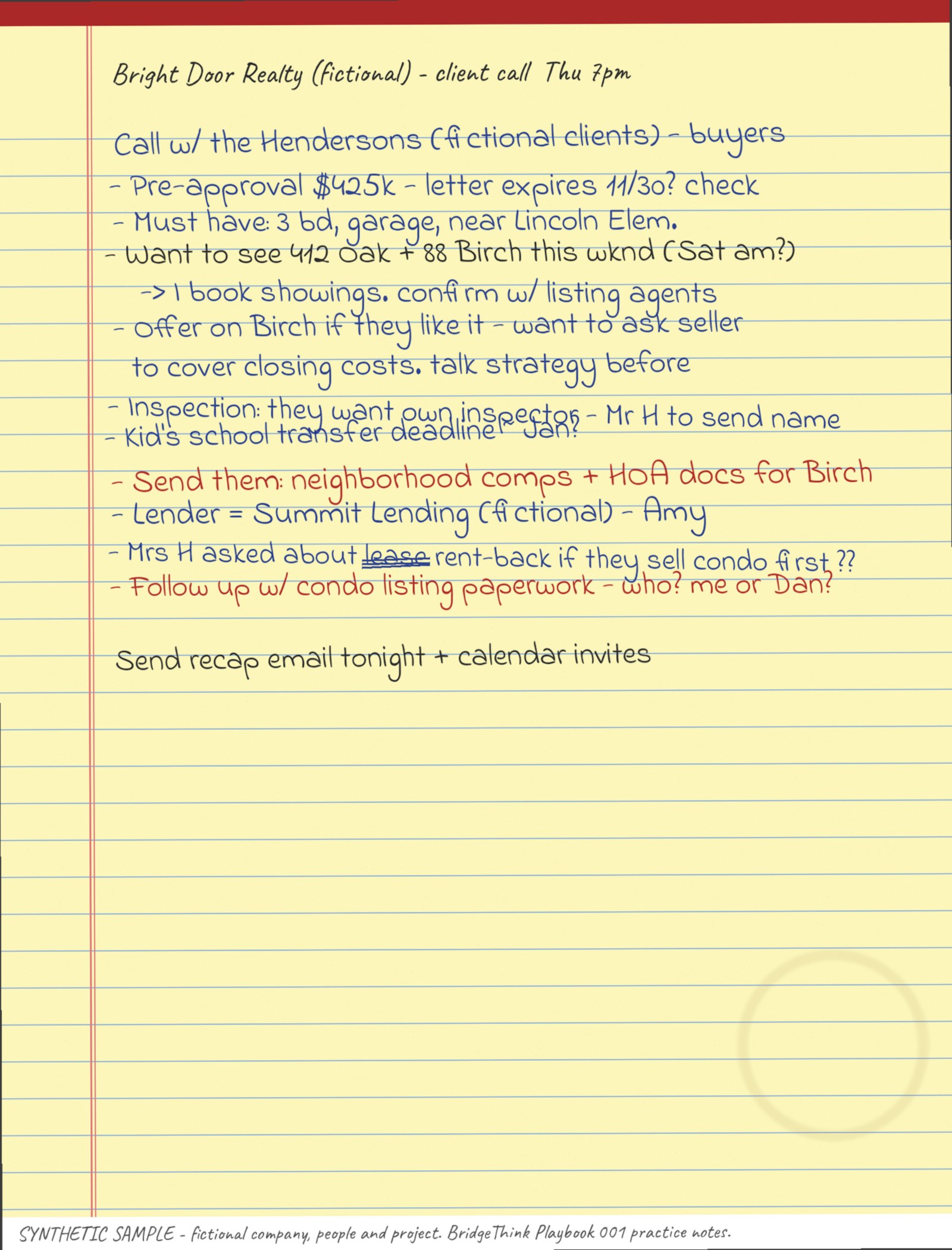
Practice with a fictional page
The sample has deliberate traps, like unclear owners and hedged dates, so you can watch the prompt catch them.
Check before you send
- CountSame number of items as your notes. Nothing missing, nothing extra.
- OwnersEvery name is actually written next to that item. Anything you didn't assign says UNCONFIRMED.
- DatesEvery date is in your notes exactly as written. Hedged dates ("Fri??") say UNCONFIRMED.
- Who owes itMe / Client / Third party only where the notes say so. "me or Dan?" stays UNCONFIRMED.
- MoneyNo price, amount or offer number that isn't in your notes.
- Illegible linesOverlapping or messy lines are flagged ILLEGIBLE, not guessed. (The practice photo has one on purpose.)
- Tone and promisesThe email promises nothing you didn't agree to. You send it, not the AI.
Privacy. Don't paste account numbers, IDs or financial documents. The email goes to a client, so double-check every price, date and address before you send it. The AI gives no legal, tax or financing advice, and neither does this page.
Recording meetings instead? Open the recorder guide →
Did it work? A two-minute survey helps decide the next playbook.